What Is the Hold Button on a Toyota Corolla?
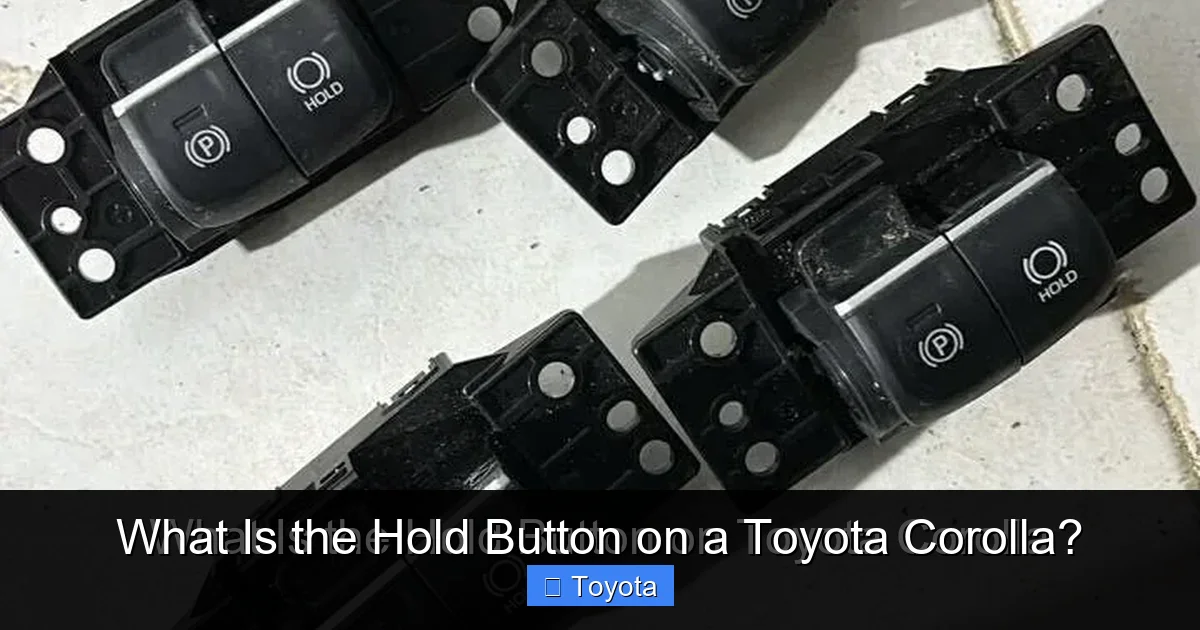
The Hold Button on a Toyota Corolla is a feature that keeps the vehicle stationary without pressing the brake pedal, making hill starts and stop‑and‑go traffic easier. It engages automatically when you press the brake and release it, holding the car until you press the accelerator. Understanding how to use this button can improve driving comfort and reduce fatigue.
When you slide into the driver’s seat of a Toyota Corolla, you’ll notice a small button labeled “Hold” near the gear shifter. At first glance it might seem like just another extra feature, but the Hold Button on a Toyota Corolla serves a practical purpose that can make daily driving noticeably easier. Whether you’re navigating a steep driveway, waiting at a long red light, or crawling through rush‑hour traffic, this button can take the strain off your right foot. In this guide we’ll explore exactly what the Hold Button on a Toyota Corolla does, how it works, when to use it, and what to watch out for.
Key Takeaways
- What the Hold Button does: It maintains brake pressure after you release the pedal, keeping the car stopped until you press the accelerator.
- When it activates: The system engages when the vehicle is stationary, the brake is pressed, and the transmission is in Drive or Reverse.
- Ideal scenarios: Use it on steep inclines, in heavy traffic, or when waiting at a long traffic light to avoid leg fatigue.
- Benefits: Reduces driver strain, improves fuel efficiency by preventing unnecessary brake wear, and offers smoother launches.
- Common myths: Some think it replaces the parking brake; it does not—it only holds the car temporarily.
- Troubleshooting tips: If the Hold Button doesn’t engage, check for brake system warnings, ensure the vehicle is stopped, and consult the owner’s manual.
📑 Table of Contents
Understanding the Hold Button on a Toyota Corolla
The Hold Button on a Toyota Corolla is part of the vehicle’s electronic braking system. When you press the brake pedal to come to a complete stop, the system can maintain that braking pressure automatically after you lift your foot. This means the car stays still without you needing to keep pressing the brake. The feature is especially helpful in situations where you would otherwise have to hold the brake for an extended period.
Think of it as a temporary parking brake that disengages the moment you press the accelerator. It does not lock the wheels like a traditional parking brake; instead, it holds the brake pressure just enough to prevent roll. Because it’s electronic, the system can react quickly and release instantly when you need to move.
Many drivers first encounter the Hold Button on a Toyota Corolla when they look at the owner’s manual or notice a small icon on the dashboard. Understanding its function early can help you make the most of this convenience feature, especially if you frequently drive in hilly areas or urban environments with lots of stops.
How the Hold Button Works
The operation of the Hold Button on a Toyota Corolla relies on the car’s brake‑by‑wire system. When you come to a stop and press the brake pedal, sensors detect that the vehicle is stationary and the brake is engaged. If you then press the Hold Button, the system tells the brake actuators to maintain pressure even after you release the pedal.
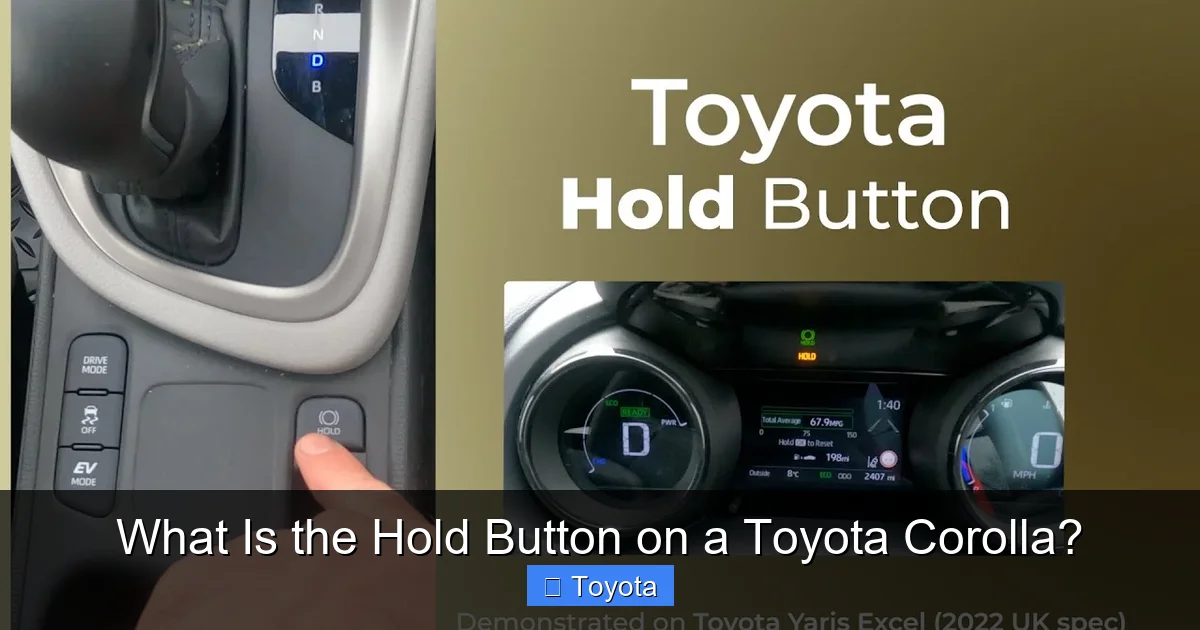
Visual guide about What Is the Hold Button on a Toyota Corolla?
Image source: i.ytimg.com
Activation Process
- Bring the Corolla to a complete stop using the brake pedal.
- Ensure the transmission is in Drive (D) or Reverse (R).
- Press the Hold Button – you’ll see a light illuminate on the instrument panel.
- Release the brake pedal; the car remains stationary.
- When you’re ready to move, press the accelerator; the hold releases automatically and the car moves forward or backward.
The system is designed to disengage if certain conditions change, such as if the driver presses the brake again, if the vehicle detects a fault, or if the car begins to roll beyond a tiny threshold. This safety logic prevents the hold from being relied upon in unsafe situations.
Integration with Other Systems
The Hold Button on a Toyota Corolla works alongside the hill‑start assist and the electronic stability control. If you’re on an incline, hill‑start assist may already hold the brakes for a couple of seconds after you release the pedal; the hold button can extend that period indefinitely until you press the accelerator. This layered approach ensures smooth transitions without rollback.
When to Use the Hold Button on a Toyota Corolla
Knowing the right moments to engage the Hold Button on a Toyota Corolla can improve comfort and reduce wear on your braking components. Below are common scenarios where this feature shines.
Hill Starts and Inclines
If you’re parked on a steep driveway or a hill, keeping the brake pressed can be tiring. Press the Hold Button on a Toyota Corolla after stopping, release the brake, and the car will stay put. When you’re ready to go, simply press the accelerator and the hold releases, giving you a smooth start without rolling backward.
Heavy Traffic and Stop‑and‑Go
In city driving, you often find yourself creeping forward a few feet, then stopping again. Instead of constantly pumping the brake, you can engage the Hold Button on a Toyota Corolla each time you come to a full stop. This lets you relax your foot while waiting for the next gap in traffic.
Long Traffic Lights or Railroad Crossings
Some intersections have unusually long red lights, or you might wait for a train to pass. Holding the brake for 30 seconds or more can cause fatigue. The Hold Button on a Toyota Corolla eliminates that strain, letting you rest your foot while remaining ready to go when the light changes.
Parking Lot Maneuvers
When you’re loading or unloading cargo, you may need to keep the car stationary while you open the trunk or rear doors. Engaging the hold button lets you do this without keeping your foot on the brake.
Benefits of Using the Hold Button on a Toyota Corolla
Beyond convenience, the Hold Button on a Toyota Corolla offers several tangible advantages that affect both driving experience and vehicle longevity.
Visual guide about What Is the Hold Button on a Toyota Corolla?
Image source: toyotaautodealer.com
Reduced Driver Fatigue
Constantly pressing the brake pedal, especially in stop‑and‑go traffic, can tire your leg muscles over a long commute. By using the hold function, you give your foot a break, which can make daily drives feel less strenuous.
Improved Fuel Efficiency
While the hold button itself doesn’t burn fuel, it encourages smoother driving. When you’re not constantly modulating the brake, you’re less likely to make abrupt accelerations that waste fuel. Smooth transitions from stop to go can contribute to better mileage over time.
Less Wear on Brake Components
Holding the brake pedal down for extended periods generates heat in the brake pads and rotors. The Hold Button on a Toyota Corolla maintains pressure without the continuous pedal force, which can reduce thermal buildup and extend the life of your brake hardware.
Enhanced Safety in Certain Situations
Because the hold releases instantly when you press the accelerator, there’s less chance of rolling back on a hill compared to relying solely on foot pressure. This can be especially helpful for new drivers or those who are less confident with hill starts.
Common Misconceptions About the Hold Button on a Toyota Corolla
Like many automotive features, the Hold Button on a Toyota Corolla is sometimes misunderstood. Clearing up these myths helps you use it correctly and safely.
“It Replaces the Parking Brake”
One frequent myth is that holding the button can serve as a permanent parking brake. In reality, the Hold Button on a Toyota Corolla is designed only for temporary stops. If you leave the vehicle unattended, you must still engage the traditional parking brake (or shift to Park) to ensure the car stays put.
“It Works While the Car Is Moving”
The hold function only activates when the vehicle is completely stationary. If you try to press the button while rolling, nothing happens. The system requires a zero‑speed input to engage.
“It Drains the Battery”
Some worry that keeping the brakes engaged electronically will drain the battery. The Hold Button on a Toyota Corolla uses minimal power, and the vehicle’s charging system easily compensates for the brief periods it’s active. Normal driving will not noticeably affect battery charge.
“It Can Be Used Instead of the Foot Brake in Emergencies”
In an emergency stop, you should always rely on the regular brake pedal. The hold function is not designed for rapid deceleration and will not provide the stopping power needed in a crisis.
Maintenance and Troubleshooting
The Hold Button on a Toyota Corolla is generally low‑maintenance, but knowing what to look for can help you address issues quickly.
Routine Checks
- When you start the car, verify that the hold indicator light illuminates briefly when you press the button.
- Listen for any unusual sounds when engaging or releasing the hold; silence is normal.
- If the brake warning light appears on the dashboard, have the braking system inspected, as it could affect hold functionality.
Common Issues
If the Hold Button on a Toyota Corolla fails to engage, consider these possibilities:
- The vehicle is not completely stopped – ensure you’re at zero mph.
- The transmission is not in Drive or Reverse – the hold only works in these gears.
- A fault in the brake‑by‑wire system – check for diagnostic trouble codes using an OBD‑II scanner.
- Low brake fluid level – insufficient hydraulic pressure can prevent the hold from maintaining brake force.
In most cases, a simple reset (turning the car off and on) resolves minor glitches. If problems persist, consult a Toyota service center.
When to Seek Professional Help
Persistent failure to hold, unexpected release while stationary, or warning lights related to the braking system are signs that a technician should examine the vehicle. Because the hold feature integrates with critical safety systems, it’s best not to ignore recurring issues.
By now you should have a clear picture of what the Hold Button on a Toyota Corolla is, how it works, and when it’s most useful. Whether you’re tackling a steep hill, sitting in a traffic jam, or just looking to reduce leg fatigue, this small button can make a noticeable difference in your driving experience. Remember to use it as a temporary aid, always keep the parking brake engaged when leaving the vehicle, and stay alert to any warning signs that might indicate a need for service. Safe travels!
Frequently Asked Questions
What does the Hold Button on a Toyota Corolla actually do?
The Hold Button on a Toyota Corolla maintains brake pressure after you release the pedal, keeping the vehicle stationary until you press the accelerator. It acts like a temporary brake hold that disengages automatically when you need to move.
Can I use the Hold Button on a Toyota Corolla instead of the parking brake?
No. The Hold Button on a Toyota Corolla is designed only for short‑term stops, such as at a traffic light or on a hill. For parking or leaving the vehicle unattended, you must still use the traditional parking brake or shift to Park.
Will using the Hold Button on a Toyota Corolla hurt my brakes?
Using the hold function actually reduces wear because it prevents you from keeping your foot on the brake pedal for long periods, which can generate heat. It does not damage the braking system when used as intended.
Is the Hold Button on a Toyota Corolla available on all model years?
Most recent Corolla models equipped with electronic braking systems include the Hold Button, but availability can vary by trim and year. Check your owner’s manual or look for the button near the gear shifter to confirm.
What should I do if the Hold Button on a Toyota Corolla doesn’t engage?
First, ensure the car is completely stopped, the brake is pressed, and the transmission is in Drive or Reverse. If it still doesn’t work, look for any brake warning lights and consider having the system inspected by a Toyota dealer.
Does the Hold Button on a Toyota Corolla work in reverse?
Yes. The hold function operates in both Drive and Reverse, as long as the vehicle is stationary and the brake pedal is applied when you press the button.