How to Check Oil Percentage in a Toyota Tacoma

Learning how to check oil percentage in a Toyota Tacoma is quick and easy. This guide walks you through each step, highlights common pitfalls, and offers tips to keep your engine healthy.
Key Takeaways
- Check the oil life monitor: The digital display shows the remaining oil life as a percentage.
- Use the steering wheel controls: Press the “Menu” button to navigate to the oil life screen.
- Interpret the reading correctly: A reading above 20% means plenty of oil left; below 5% signals an urgent change.
- Avoid common mistakes: Don’t confuse the oil life indicator with the maintenance reminder.
- Reset after oil change: Hold the “Reset” button to clear the old percentage.
- Maintain regular oil changes: Even if the percentage looks high, follow the manufacturer’s schedule.
- Combine with other checks: Inspect brakes, battery, and other systems for overall health.
📑 Table of Contents
The Importance of Monitoring Oil Percentage
Engine oil keeps every moving part lubricated. When the oil gets dirty or low, wear increases fast. In a Toyota Tacoma, the onboard computer tracks how much life is left in the current oil. Knowing the exact percentage helps you avoid surprise breakdowns. It also lets you plan oil changes before damage occurs. This simple check can save you money and keep your truck running smooth for years.
How the Toyota Tacoma Oil Life Monitor Works
The Tacoma uses a sensor that measures engine load, temperature, and mileage. It then calculates an estimated oil life and shows it as a percentage on the dashboard. The system resets automatically after each oil change if you follow the proper steps. Understanding the algorithm helps you trust the reading and know when to act.

Visual guide about How to Check Oil Percentage in a Toyota Tacoma
Image source: toyotaautodealer.com
Factors That Influence the Reading
Short trips, heavy towing, and extreme temperatures can speed up oil degradation. The monitor accounts for these variables. If you frequently drive in stop‑and‑go traffic, the percentage may drop faster than expected. Conversely, long highway drives tend to preserve oil life longer.
Step‑by‑Step Guide: How to Check Oil Percentage in a Toyota Tacoma
Below is a simple, step‑by‑step process you can follow anytime you need to verify oil health.
Visual guide about How to Check Oil Percentage in a Toyota Tacoma
Image source: cdn.motor1.com
Prepare Your Vehicle
Make sure the truck is parked on a level surface and the engine is off. Wait a few minutes for the oil to settle. This ensures the reading is accurate.
Access the Dashboard Display
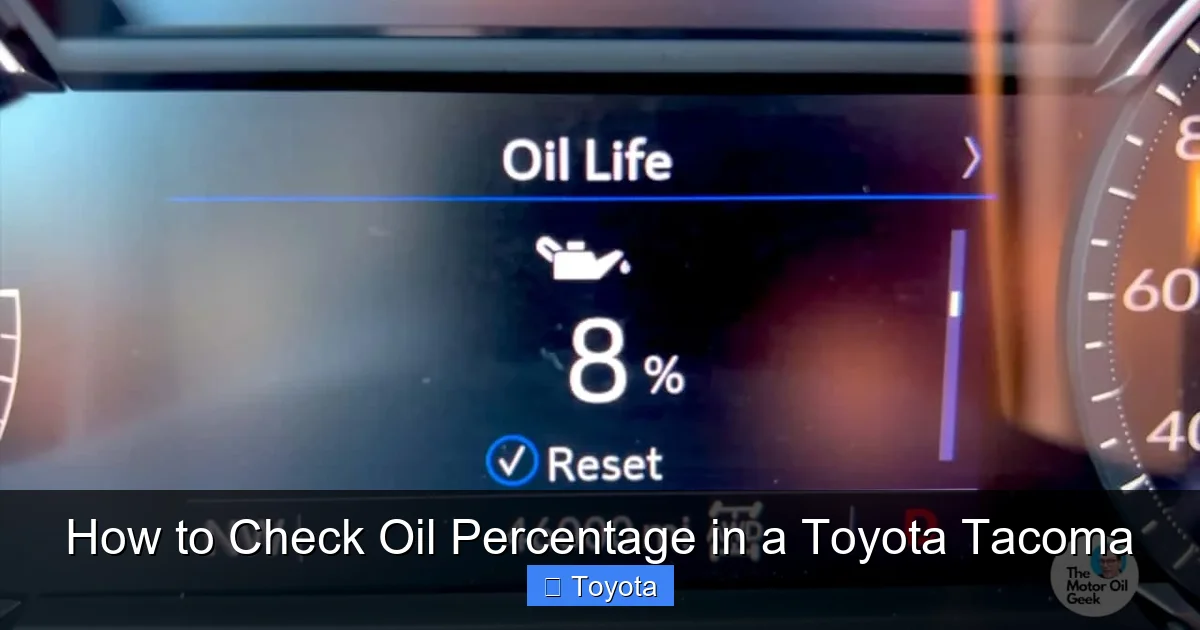
Turn the ignition to the “ON” position without starting the engine. Press the “Menu” button on the steering wheel. Navigate to the “Vehicle Settings” menu, then select “Maintenance” or “Oil Life”. The screen will display the current oil percentage.
Interpret the Reading
If the display shows 80%, you have plenty of oil life left. A reading of 30% suggests you should plan an oil change soon. When the percentage falls below 10%, schedule a service immediately. Remember, the number is an estimate, not an exact measurement.
Reset the Monitor After an Oil Change
After you change the oil, you must reset the monitor. Press and hold the “Reset” button on the steering wheel until the percentage returns to 100%. This tells the system that fresh oil is now in place.
Common Mistakes and How to Avoid Them
Even simple tasks can be done incorrectly. Here are the most frequent errors and how to prevent them.

Visual guide about How to Check Oil Percentage in a Toyota Tacoma
Image source: i.ytimg.com
Using the Wrong Button
Some drivers press “Up” or “Down” instead of “Menu”. This can skip the oil life screen entirely. Practice the sequence a few times when the vehicle is off to commit it to memory.
Ignoring Service Intervals
The oil life percentage is only a guide. Toyota recommends an oil change every 5,000 to 7,500 miles, depending on driving conditions. Don’t wait for the display to hit zero before changing the oil.
Misreading the Display
Some owners mistake the maintenance reminder for the oil life indicator. The maintenance reminder shows a wrench icon, while the oil life shows a percentage number. Keep these distinct in your mind.
Tips to Keep Your Engine Oil Healthy
Beyond checking the percentage, you can extend oil life with a few easy habits.
Use the Manufacturer‑Recommended Oil
Toyota specifies a particular viscosity and grade for the Tacoma. Using the correct oil ensures optimal protection and longer life. Check your owner’s manual for the exact specification.
Schedule Regular Oil Changes
Even if the percentage looks high, adhere to the recommended mileage intervals. Frequent changes prevent sludge buildup and keep engine performance peak.
Monitor Engine Temperature
Overheating accelerates oil breakdown. Keep an eye on the temperature gauge and address any cooling issues promptly.
Combine with Other Maintenance Checks
While you’re under the hood, inspect other critical components. For example, learn how to check brake pads in your car to avoid brake failure. Also, consider the break‑in process for a new Toyota if you recently purchased one. Proper battery care, such as maintaining a car battery in cold weather, also supports overall engine health.
Frequently Asked Questions
How often should I check the oil percentage?
It’s a good idea to check the oil life monitor at least once a month, or before long trips. Regular checks keep you ahead of any potential issues.
Can I rely solely on the percentage to schedule an oil change?
No. The percentage is an estimate. Follow Toyota’s recommended mileage intervals regardless of the displayed number.
What does a 0% reading mean?
A 0% reading indicates the system thinks the oil has reached its end of life. Schedule an oil change immediately to avoid engine damage.
Do I need a special tool to reset the oil life monitor?
No special tools are required. Use the “Reset” button on the steering wheel to clear the old percentage after an oil change.
Is the oil life monitor accurate in extreme weather?
The monitor adjusts for temperature and driving conditions, but very harsh climates can still affect accuracy. Use your judgment and inspect the oil manually if you suspect a problem.
Can I check the oil percentage without starting the engine?
Yes. The display updates as soon as you turn the ignition to the “ON” position, even if the engine is off.
Should I reset the monitor after every oil change?
Absolutely. Resetting ensures the system starts counting from a fresh baseline and gives you an accurate future reading.
Conclusion
Knowing how to check oil percentage in a Toyota Tacoma is a simple skill that pays big dividends. By regularly monitoring the oil life indicator, you protect your engine, avoid costly repairs, and keep your truck ready for any adventure. Combine this knowledge with routine maintenance, proper oil changes, and occasional checks of related systems like brakes and batteries. With these habits, your Tacoma will stay reliable for years to come.
Frequently Asked Questions
How often should I check the oil percentage?
Check the oil percentage at least once a month or before long trips to stay ahead of any potential issues.
Can I rely solely on the percentage to schedule an oil change?
No. Always follow Toyota’s recommended mileage intervals in addition to monitoring the percentage.
What does a 0% reading mean?
A 0% reading means the system thinks the oil has reached its end of life; schedule an oil change immediately.
Do I need a special tool to reset the oil life monitor?
No special tools are needed; simply hold the “Reset” button on the steering wheel after an oil change.
Is the oil life monitor accurate in extreme weather?
The monitor adjusts for temperature, but extreme conditions can affect accuracy, so use discretion.
Can I check the oil percentage without starting the engine?
Yes, the display updates as soon as you turn the ignition to “ON,” even with the engine off.
Should I reset the monitor after every oil change?
Yes, resetting after each oil change ensures an accurate baseline for future readings.