How to Reset the Maintenance Light on a Toyota Yaris
Resetting the maintenance light on a Toyota Yaris is easier than you think—just follow this clear, step‑by‑step guide and keep your car in top shape.
From understanding why the light appears to mastering the reset procedure, we cover everything you need to know to get the warning back to zero.
Every time you check your dashboard, the little blue light on the instrument cluster may flash or remain lit, warning you that it’s time for routine maintenance. If you’re a Toyota Yaris owner, you’ve likely wondered: How to Reset the Maintenance Light on a Toyota Yaris? This article gives you a no‑frills, step‑by‑step answer, plus extra tips to keep that light from coming back.
Key Takeaways
- Know the cause: The maintenance light signals regular service intervals, not a mechanical failure.
- Simple reset steps: Two common methods—button press and key cycle—work on most Yaris models.
- Use the owner’s manual: It contains model‑specific reset instructions and service schedules.
- Keep records: Log dates and mileage for future equally accurate resets.
- Prevention matters: Follow the service schedule to avoid lingering lights.
📑 Table of Contents
- 1. Understanding the Maintenance Light on a Toyota Yaris
- 2. How to Reset the Maintenance Light on a Toyota Yaris: Step‑by‑Step Methods
- 3. Practical Tips for a Smooth Reset
- 4. Common Mistakes When Resetting the Maintenance Light
- 5. Preventing Future Maintenance Light Alerts
- 6. Related DIY Projects for Your Yaris
- Conclusion
1. Understanding the Maintenance Light on a Toyota Yaris
The maintenance light is part of Toyota’s Maintenance Minder system, designed to remind drivers when the car needs routine service—oil changes, filter replacements, and other scheduled checks. It isn’t a red flag for major issues, but if left unattended, it can lead to unnecessary wait times or missed service.
Why the Light Appears
When you drive past a certain mileage or time interval, the car’s computer triggers the light. For many Yaris models, the default interval is every 5,000 miles or six months, whichever comes first. However, some owners may have a different schedule based on their driving conditions.
Common Misconceptions
Many believe that the maintenance light is a sign of a serious fault. In reality, it’s……
2. How to Reset the Maintenance Light on a Toyota Yaris: Step‑by‑Step Methods
Method A: The Button‑Press Reset (Standard for 2015–2020 Yaris)
1. Start the car. Turn the key or push the start button while keeping the brake pressed.
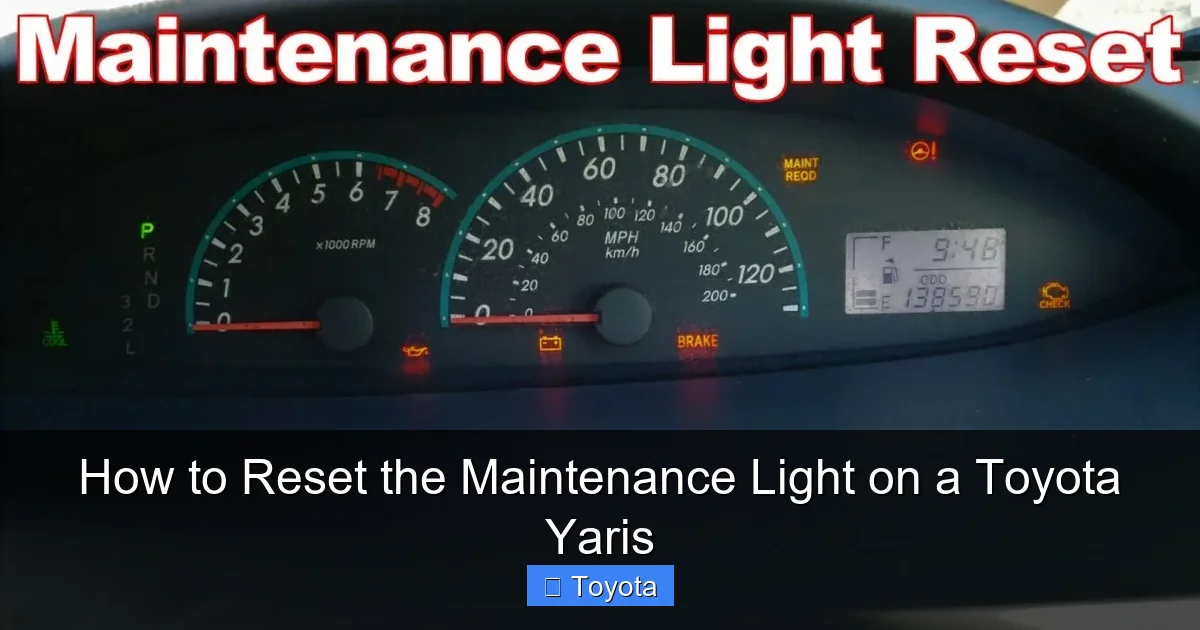
Visual guide about How to Reset the Maintenance Light on a Toyota Yaris
Image source: i.ytimg.com
2. Locate the reset button. On the dashboard near the speedometer, a small button labeled “Reset” or “Maintenance” sits inside the instrument cluster.
3. Press and hold. While the engine is running, press and hold the reset button for about 10 seconds.
4. Watch the light. The maintenance light should blink or turn off, indicating a successful reset.
5. Confirm. Turn off the engine, then restart to ensure the light remains off.
Method B: The Key‑Cycle Reset (Works on 2013–2014 Yaris and older)
1. Shift to neutral. Ensure the gear lever is in neutral or park.
2. Turn the key to “On.” Do not start the engine; just bring the car to the ON position.
3. Press the brake pedal. Keep it depressed.
4. Turn the key to “Off.” Wait a few seconds, then turn it back to “On.”
5. Watch the dashboard. The añadir light should flash or go dark. If it stays lit, repeat the cycle once more.
Method C: woven Reset via the OBD‑II Port (Advanced)
For those who prefer using a diagnostic scanner, connect a standard OBD‑II reader to the Yaris’s port located under the dash. Set the scanner to “Reset Service Interval.” Follow the on‑screen prompts to clear the maintenance light. This method is handy if you already own a scan tool or plan to do a full diagnostics session.
3. Practical Tips for a Smooth Reset
Always Read the Owner’s Manual
Your Yaris’s manual will list the exact reset procedure for your year and trim. If you don’t have a physical copy, Toyota’s website offers downloadable PDFs.
Keep a Service Log
After resetting, jot down the mileage and date. This record helps you remember when the next service is due and ensures the reset aligns with the actual maintenance schedule.
Don’t Skip the Service
Even after resetting, it’s essential to perform the recommended maintenance—replace oil, inspect brakes, and change air filters. Resetting only clears the dieren light; it does not perform the work.
Check for Additional Warnings
Sometimes the maintenance light can appear alongside other dashboard messages. If you see a check engine light, a battery warning, or a tire pressure alert, address those issues promptly.
4. Common Mistakes When Resetting the Maintenance Light
Using the Wrong Button
Some Yaris models have a small “service” button hidden inside the cluster. Pressing the wrong button can leave the light active.
Not Holding the Button Long Enough
For the button‑press method, holding for less than 10 seconds may not trigger the reset, leading to frustration.
Ignoring the Service Schedule
A reset is only useful if you actually perform the maintenance. Skipping the oil change after resetting will eventually bring the light back on.
Using a Faulty Scan Tool
Some cheap OBD‑II readers may not support the service interval reset function. Stick with reputable brands like Autel or Bosch.
5. Preventing Future Maintenance Light Alerts
Stick to the Schedule
Set calendar reminders or use a maintenance app to alert you when the next service is due.
Monitor Oil Levels Regularly
Low oil can trigger the light. A quick check every week keeps the system happy.
Keep Tires Properly Inflated
Under‑inflated tires affect mileage and can cause the system to misinterpret wear levels.
Use Quality Fuel
Premium or low‑octane fuel can affect engine performance and trigger maintenance alerts.
6. Related DIY Projects for Your Yaris
Replacing Windshield Wipers
Learn how to replace windshield wipers on a car for a clear view during rain.
Breaking In a New Toyota
If you have a brand‑new Yaris, read about how to break in a new car Toyota for optimal performance.
Keeping Your Windows Secure
Discover ways to keep a car window from sliding down and protect your interior.
Conclusion
Resetting the maintenance light on a Toyota Yaris is a quick, DIY-friendly task that keeps your vehicle’s service reminders honest. By following the button‑press or key‑cycle steps, double‑checking your owner’s manual, and logging each reset, you maintain a clear record of when the next service is due. Remember, resetting is only a part of the equation—you still need to perform the actual maintenance to keep your Yaris running smoothly. With these simple steps, you’ll keep that little blue light off and stay on top of your car’s health.
Frequently Asked Questions
What does the maintenance light mean on my Yaris?
The maintenance light signals that it’s time for routine service like an oil change or filter replacement, based on mileage or time intervals.
Can I reset the maintenance light without a diagnostic tool?
Yes. The button‑press or key‑cycle methods are designed for owners, no scanner needed.
Will resetting the maintenance light impact my warranty?
No. Resetting is a standard procedure and does not affect warranty coverage.
What if the light stays on after I reset it?
Check the reset procedure for your specific model year, ensure you held the button long enough, and confirm that the engine is running properly.
How often should I reset the maintenance light on my Yaris?
Only after each scheduled service. The light will reappear automatically at the next interval.
Is there a way to avoid the maintenance light altogether?
Maintaining regular service and keeping the vehicle within its recommended conditions will reduce unnecessary light triggers, but the system is designed to remind you of essential upkeep.