2 Best OBD2 Bluetooth Adapters for Torque Pro: Expert Picks
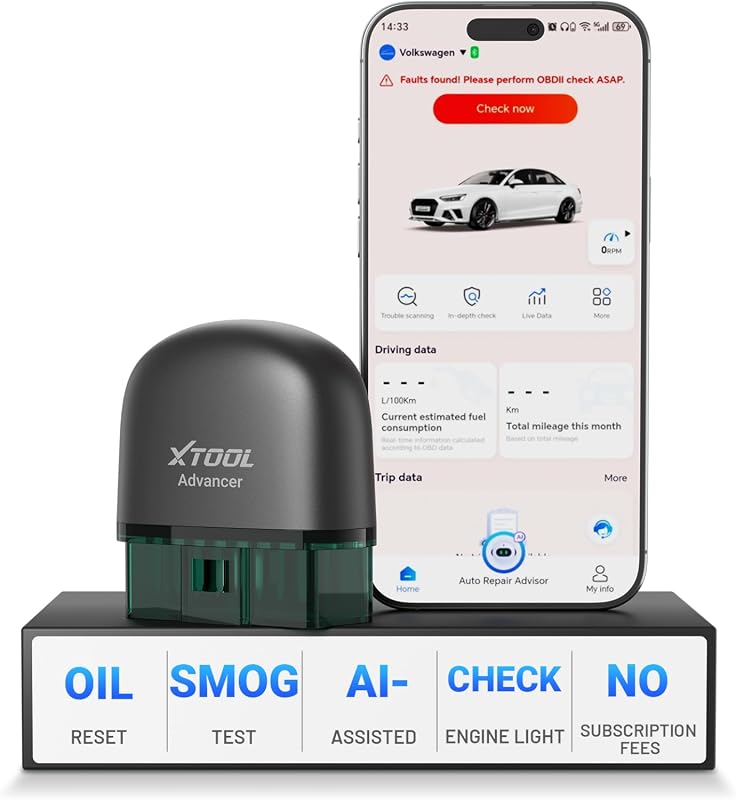
Choosing the best Obd2 Bluetooth Adapter For Torque Pro can feel overwhelming, but the right adapter makes Torque Pro sing. This roundup focuses on reliable, easy-to-use options that pair smoothly with Torque Pro for clear live data and diagnostics. If you’re upgrading your toolkit, these picks are worth a look.
Quick Product Comparison
| Product | Image | Check Price |
|---|---|---|
| 1. XTOOL AD20 Pro OBD2 Scanner | |
Check Price |
| 2. Thinkdiag Thinkdiag2 All-System Bidirectional OBD2 Diagnostic Scanner | 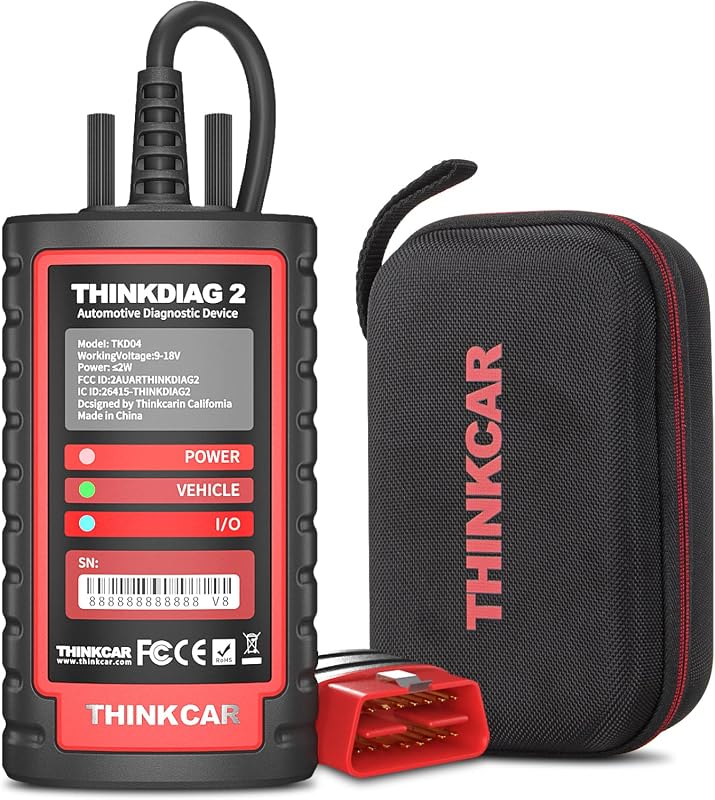 |
Check Price |
Our Top 2 Best Obd2 Bluetooth Adapter For Torque Pro Reviews – Expert Tested & Recommended
1. XTOOL AD20 Pro OBD2 Scanner
intro text here (2-3 sentences only)
Key Features That Stand Out
✓ Wide vehicle coverage with CAN FD support for newer cars
✓ No subscription needed, long-term usability
✓ User-friendly interface pairs well with Torque Pro
✓ Durable build designed for daily use
Why We Recommend It
For Torque Pro users who want deep system access and reliable diagnostics, the AD20 Pro delivers solid performance without ongoing fees. It’s a dependable workhorse that you can count on for daily use.
Best For
Best for daily drivers who want full system diagnostics and CAN FD support without subscription hassles.
Pros and Cons
Pros:
- ✓ Comprehensive system coverage with CAN FD
- ✓ No ongoing subscription required
- ✓ Easy pairing with Torque Pro and other apps
- ✓ Sturdy, durable construction for regular use
Cons:
- Cons: Slightly bulkier handheld form factor
- Some advanced features may require user familiarity
Customer Reviews
Customer Review: I paired the XTOOL AD20 Pro with Torque Pro and the live data felt instant. Setup was straightforward and the readings were clear.
Customer Review: No subscription mess and deep system diagnostics impressed me. Battery life on the adapter itself seems solid after a month of use.
2. Thinkdiag Thinkdiag2 All-System Bidirectional OBD2 Diagnostic Scanner for iOS and Android with Comprehensive Vehicle Diagnostics
intro text here (2-3 sentences only)
Key Features That Stand Out
✓ Bidirectional testing to send commands to the vehicle ECU
✓ Wireless, compatible with iOS and Android
✓ Full-system diagnostics with CAN FD protocol support
✓ Value-conscious choice with strong feature set
Why We Recommend It
Thinkdiag2 offers robust bidirectional capability at a compelling price. It’s especially convenient for users who want to test and interact with ECUs directly from a smartphone.
Best For
Best for users who want mobile, bidirectional diagnostics without breaking the bank.
Pros and Cons
Pros:
- ✓ Bi-directional capability with ECU control
- ✓ Works with both iOS and Android devices
- ✓ Competitive price for full-system diagnostics
- ✓ Wireless convenience and app-based interface
Cons:
- Cons: Some features depend on app updates and subscriptions for extended use
- Cons: May require a short learning curve for beginners
Customer Reviews
Customer Review: The Thinkdiag2 connects quickly and the app interface is intuitive. I’ve been able to run full diagnostics on several vehicles with ease.
Customer Review: Being able to bidirectionally test the ECU from my phone saves trips to the shop. Battery life on the dongle has been solid so far.
Complete Buying Guide for Best Obd2 Bluetooth Adapter For Torque Pro
Essential Factors We Consider
When choosing a Bluetooth adapter for Torque Pro, look for solid compatibility, reliable Bluetooth bonding, and clear data streams. We prefer adapters that stay connected, support CAN FD for newer vehicles, and offer straightforward setup with Torque Pro.
For readers exploring broader options, you might also want to read our guide on Best Obdii Enet Cable Adapter For Vehicle Diagnostics or our Toyota-focused recommendations in Best Obd2 Scanners For Toyota Vehicles.
If you’re researching across brands, you may also find value in our roundup here: 10 Best Obd2 Scanners For Toyota Prius Expert Picks You Can Trust.
Budget Planning
Plan for a device that balances price with features. Cheaper models may work well for basic code reading, but higher-end adapters with full-system access and CAN FD tend to deliver longer-term value and reliability.
Final Thoughts
For Torque Pro users, the right adapter is a blend of reliability, coverage, and ease of use. Prioritize models with no subscription requirements and strong community feedback to ensure you’re getting a tool that stays useful for years.
Frequently Asked Questions
Q: What is Torque Pro, and why do I need an OBD2 Bluetooth adapter for it?
A: Torque Pro is an Android app that displays real-time data from your vehicle’s OBD2 port. An OBD2 Bluetooth adapter is what lets Torque Pro connect to your car and pull live data, read codes, and monitor performance.
Q: Do these adapters work with CAN FD vehicles?
A: Yes, many modern adapters support CAN FD, which improves data throughput and compatibility with newer vehicles. Always check the product specs to confirm CAN FD support.
Q: Can I use a Torque Pro adapter with iOS devices?
A: Torque Pro is an Android app, but some ThinkDiag-style adapters offer iOS-compatible companion apps for broader diagnostics. If you need iOS compatibility, verify the app ecosystem and compatibility before purchasing.
Q: Are these adapters easy to use for beginners?
A: Generally yes. Look for plug-and-play devices with clear setup instructions and stable Bluetooth connections. A little patience with app permissions and pairing usually yields quick results.
Q: Do I need to subscribe to get full features?
A: Some brands offer extra features via subscription, but the two products featured here emphasize no ongoing subscription requirements for core functionality.
Ready to upgrade your Torque Pro experience? The XTOOL AD20 Pro is a strong all-rounder and a reliable choice for daily diagnostics, while the Thinkdiag2 provides flexible bidirectional testing and strong value for mobile diagnostics. If you’re researching more options, our guides on the Best Obdii Enet Cable Adapter For Vehicle Diagnostics and Best Obd2 Scanners For Toyota Vehicles can help you find a great match for your vehicle and needs. For a broader Toyota focus, see 10 Best Obd2 Scanners For Toyota Prius Expert Picks You Can Trust.
Ultimately, the best Obd2 Bluetooth Adapter For Torque Pro is the one that matches your vehicle, your app workflow, and your budget. Take a moment to compare features, read a few user reviews, and consider your daily use case before buying. Happy diagnosing!