Car Simulator Vietnam Apk Obb Free Download
Car Simulator Vietnam offers an authentic driving experience through detailed Vietnamese cities and countryside. This guide covers everything you need to know about the car simulator vietnam apk obb free download process, gameplay features, and tips for getting the most out of this popular mobile simulation game.
Have you ever dreamed of cruising through the bustling streets of Hanoi or enjoying a coastal drive along Da Nang’s famous beaches? Car Simulator Vietnam brings that experience right to your smartphone. This incredibly detailed driving simulation has captured the hearts of millions of players worldwide with its authentic representation of Vietnamese roads, traffic, and culture. Whether you’re a simulation enthusiast or just looking for a fun driving game, this title offers something special that sets it apart from generic racing games.
Finding a reliable car simulator vietnam apk obb free download source can be tricky with so many websites offering modified or outdated versions. This comprehensive guide walks you through everything from installation requirements to advanced gameplay strategies. We’ll cover the game’s standout features, system requirements, safe download practices, and pro tips to help you master Vietnamese roads like a local. By the end, you’ll have all the knowledge needed to enjoy this exceptional driving simulator to its fullest potential.
Key Takeaways
- Realistic Vietnamese Environment: Drive through accurately modeled cities like Hanoi and Ho Chi Minh City with local traffic patterns.
- Extensive Car Customization: Modify engines, suspensions, paint jobs, and interiors for hundreds of vehicle combinations.
- APK OBB Installation Required: The game requires both APK and OBB files for full functionality on Android devices.
- Free-to-Play Model: Core gameplay is free with optional in-app purchases for premium vehicles and currency.
- Multiple Game Modes: Enjoy career mode, free roam, multiplayer racing, and special challenge events.
- Regular Updates: Developers frequently add new cars, maps, and features based on community feedback.
- Offline Play Available: Most single-player modes work without an internet connection after initial setup.
📑 Table of Contents
What Makes Car Simulator Vietnam Special
Authentic Vietnamese Locations
The developers have painstakingly recreated Vietnam’s most iconic locations with impressive accuracy. You’ll recognize landmarks like the Bitexco Financial Tower in Ho Chi Minh City, the ancient streets of Hoi An, and the winding mountain passes of Ha Giang. The attention to detail extends to street signs, traffic light patterns, and even the distinctive Vietnamese license plates. Day-night cycles and dynamic weather systems further enhance the immersion, making each drive feel unique.
Realistic Traffic Behavior
One of the game’s most praised features is its traffic AI. Motorbikes weave through lanes just like in real Vietnam, buses stop frequently, and pedestrians cross streets unpredictably. This creates a genuinely challenging driving experience that requires constant attention. The traffic density changes based on time of day, with rush hour presenting a completely different challenge than late-night cruising. Learning to anticipate these patterns is key to becoming a skilled virtual driver.
Deep Vehicle Customization
Car enthusiasts will appreciate the extensive modification system. Beyond cosmetic changes like paint colors, vinyl wraps, and rim designs, you can tune performance parameters including engine mapping, suspension stiffness, brake balance, and gear ratios. Each adjustment affects handling characteristics noticeably. Want a drift-ready sedan for mountain passes? Or a comfortable cruiser for city commuting? The choice is yours. This depth keeps the gameplay fresh for hundreds of hours.
System Requirements and Compatibility
Minimum Device Specifications
Before attempting any car simulator vietnam apk obb free download, verify your device meets the minimum requirements. The game runs on Android 7.0 (Nougat) or higher with at least 3GB RAM. A quad-core processor clocked at 1.8GHz or better ensures smooth performance. You’ll need approximately 2.5GB of free storage space for the initial installation, plus additional space for updates and cache files. Devices with Mali-G72 or Adreno 610 GPUs and above will handle graphics settings comfortably.
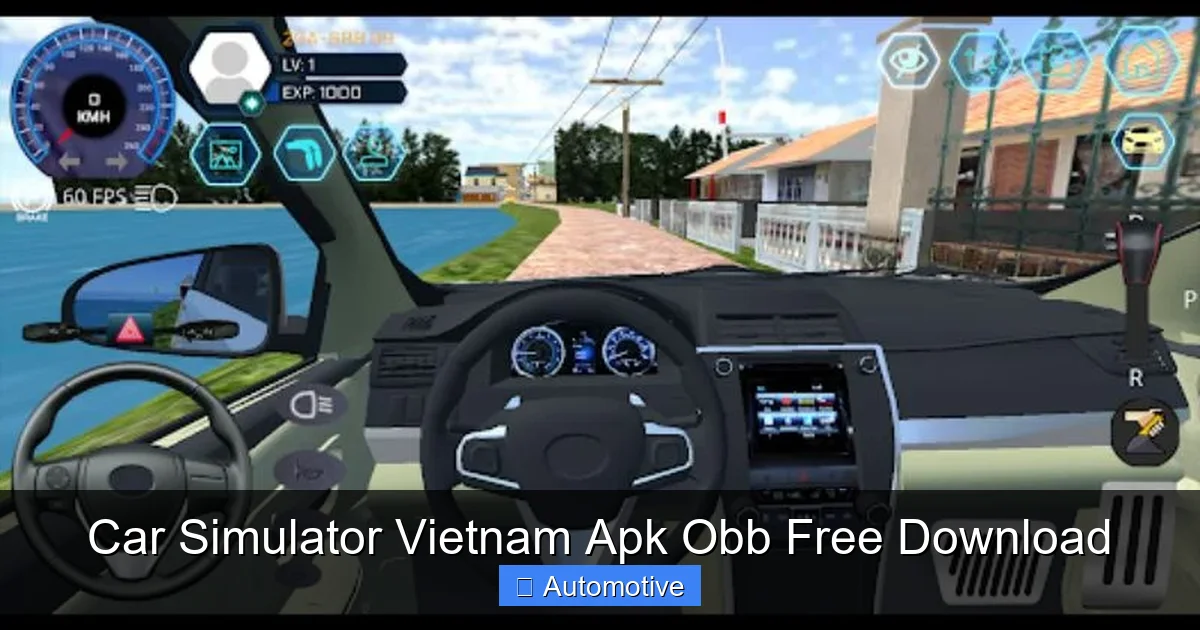
Visual guide about Car Simulator Vietnam Apk Obb Free Download
Image source: androidmentor.org
Recommended Specifications for Best Experience
For the optimal experience with high graphics settings and stable 60fps gameplay, aim for Android 10+ with 6GB+ RAM and a Snapdragon 765G / MediaTek Dimensity 1000 or equivalent processor. Flagship devices from the last three years typically exceed these requirements. A 1080p or higher resolution display showcases the detailed environments beautifully. Consider a device with good thermal management since extended gaming sessions can cause throttling on some phones.
Storage Considerations
The OBB file alone exceeds 1.5GB, and the APK adds another 100MB. After installation, the game occupies roughly 2.2GB. Major updates can temporarily require double that space during installation. If your device has limited internal storage, consider moving other apps to an SD card (if supported) or clearing unused files beforehand. The game doesn’t support installing the OBB file on external storage, so internal space is mandatory.
Safe Download and Installation Process
Official Sources vs Third-Party Sites
The safest way to get the game is through the Google Play Store, which handles both APK and OBB installation automatically. However, some regions may not have access, or you might want a specific version. If using third-party sites, stick to reputable platforms like APKMirror, APKPure, or the developer’s official website. Avoid sites with excessive pop-ups, mandatory surveys, or executable (.exe) downloads for an Android game. These are red flags for malware or adware bundles.
Step-by-Step Installation Guide
If downloading manually, first enable “Install from Unknown Sources” in your Android security settings for the browser or file manager you’re using. Download both the APK and OBB files (usually in a ZIP archive). Install the APK but do not open the game yet. Extract the OBB folder (typically named “com.ovilex.carsimulatorvietnam”) to Android/obb/ on your internal storage. The final path should be Android/obb/com.ovilex.carsimulatorvietnam/main.xxx.com.ovilex.carsimulatorvietnam.obb. Now launch the game.
Troubleshooting Common Issues
“Parse Error” usually means a corrupted APK download or version mismatch between APK and OBB. Redownload both from the same source. “License Verification Failed” occurs when the game can’t contact Play Store servers; this is normal for sideloaded versions and typically resolves after a few launches. Black screens or crashes on startup often indicate insufficient RAM or an incompatible GPU driver. Try lowering graphics settings in the game’s config file (located in Android/data/com.ovilex.carsimulatorvietnam/files/) before launching.
Gameplay Modes and Progression
Career Mode Journey
Career mode serves as the primary single-player campaign. You start with a basic sedan and limited funds, completing delivery missions, taxi fares, and racing events to earn money and reputation. Each region unlocks progressively: begin in Hanoi’s Old Quarter, expand to greater Hanoi, then Ho Chi Minh City, Da Nang, and eventually the mountainous northern provinces. Missions vary from simple point-to-point drives to timed challenges with strict traffic law adherence. The progression feels rewarding without excessive grinding.
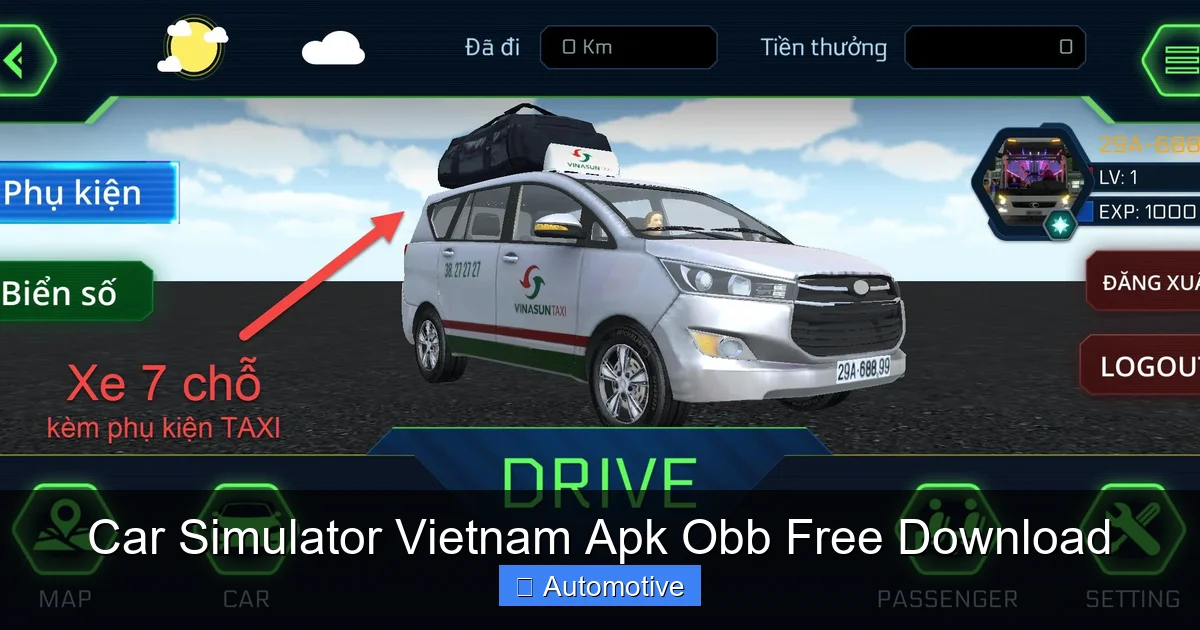
Visual guide about Car Simulator Vietnam Apk Obb Free Download
Image source: image.winudf.com
Free Roam Exploration
Free roam removes all objectives, letting you drive anywhere on the unlocked map at your own pace. This mode is perfect for discovering hidden locations, practicing difficult maneuvers, or simply enjoying the scenery. You can switch vehicles instantly from your garage without returning to a specific location. Photo mode with filters and camera controls lets you capture stunning virtual photography of your customized rides against Vietnamese backdrops. Many players spend hours just cruising and taking screenshots.
Multiplayer and Social Features
Online multiplayer supports up to 16 players in a shared session. Modes include casual cruising, organized meets, sprint races, and drift competitions. The game uses peer-to-peer networking with host migration, so sessions continue even if the original host leaves. Voice chat isn’t built-in, but text chat and quick emotes facilitate communication. Weekly community events offer exclusive cosmetic rewards. Cross-platform play between Android and iOS versions works seamlessly.
Advanced Tips for Mastering the Game
Efficient Money Making Strategies
Early game funds can be tight. Focus on “Long Distance Delivery” missions in career mode; they offer the best money-per-minute ratio once you learn the routes. Avoid speeding tickets by using the cruise control feature (available on most cars after level 15). Invest your first 500,000 VND in a used Toyota Vios or Honda City; they balance fuel efficiency, reliability, and resale value. Daily login bonuses and watching optional ads for double mission rewards accelerate progress significantly.
Mastering Vietnamese Traffic Patterns
The key to stress-free driving is understanding motorbike behavior. They rarely use turn signals and often occupy the space between lanes. Give them extra room and never make sudden lane changes without checking mirrors twice. At intersections without signals, the “first to enter, first to go” rule applies informally. Horn usage is communicative, not aggressive; a short tap signals your presence, while a long blast warns of danger. Adopting local driving etiquette makes navigation much smoother.
Optimizing Car Setups for Different Scenarios
Create multiple garage presets for different situations. A “City Commuter” setup prioritizes fuel economy, soft suspension for potholes, and responsive brakes for sudden stops. A “Mountain Attack” preset needs stiff suspension, limited-slip differential, and short gear ratios for hairpin turns. “Highway Cruiser” benefits from tall gears, aerodynamic body kits, and comfort-oriented tires. Switching presets costs nothing and takes seconds, so experiment freely. The tuning menu shows real-time performance graphs for each adjustment.
Community, Mods, and Future Updates
Active Modding Community
While the official game doesn’t support mods on Android, the PC version (available via emulators) has a thriving mod scene. Community creators add real-world Vietnamese car models (VinFast models, local taxi variants), enhanced graphics shaders, and expanded maps. If you’re technically inclined, you can sideload some PC mods to Android using file replacement techniques, but this risks stability and online bans. The developers tolerate single-player mods but strictly prohibit multiplayer modifications.
Developer Roadmap and Update History
Ovilex Software releases major updates quarterly, with minor patches monthly. Recent additions include the VinFast VF8 and VF9 electric SUVs, a detailed Da Lat map expansion, and a comprehensive livery editor. The roadmap hints at a future “Vehicle Workshop” update allowing players to create and share custom car models. They actively solicit feedback through their Discord server and in-game surveys. Staying updated ensures access to new content and bug fixes.
Joining the Player Community
The official Discord server has over 50,000 members sharing tips, screenshots, and organizing multiplayer meets. Reddit’s r/CarSimulatorVietnam is great for technical help and feature discussions. YouTube creators like “Vietnam Virtual Driver” and “Saigon Sim Racer” produce excellent tutorial series in both English and Vietnamese. Participating in community events not only enhances enjoyment but sometimes earns exclusive in-game items not obtainable otherwise.
Conclusion
Car Simulator Vietnam stands as a remarkable achievement in mobile gaming, offering an authentic slice of Vietnamese driving culture wrapped in a polished simulation package. The combination of realistic environments, deep customization, and varied gameplay modes creates an experience that’s both accessible to newcomers and rewarding for hardcore sim enthusiasts. Whether you’re navigating chaotic city intersections or enjoying a peaceful coastal sunset drive, the attention to detail consistently impresses.
Getting started with a car simulator vietnam apk obb free download is straightforward when following proper installation procedures. Prioritize official sources for security, but reputable third-party sites work fine with basic precautions. Once installed, take time to learn the unique traffic patterns, experiment with different vehicle builds, and engage with the passionate community. The game’s free-to-play model is generous, and regular updates ensure fresh content for years to come.
So buckle up, adjust your mirrors, and prepare for one of the most culturally rich driving experiences available on mobile. The roads of Vietnam are waiting, and they’re more beautiful and challenging than you might imagine. Happy driving, and remember: in Vietnam, the horn is your friend!
Frequently Asked Questions
Is Car Simulator Vietnam completely free to play?
Yes, the base game is free to download and play. All maps, most vehicles, and core gameplay modes are accessible without payment. Optional in-app purchases exist for premium currency, exclusive vehicle unlocks, and cosmetic items, but they’re not required for progression.
Can I play Car Simulator Vietnam offline?
Most single-player modes including career, free roam, and time trials work fully offline after the initial license verification. Multiplayer, daily rewards, and cloud saves require an internet connection. The initial launch after installation needs brief online access.
What’s the difference between APK and OBB files?
The APK contains the game’s code and core assets, while the OBB (Opaque Binary Blob) holds large media files like maps, high-resolution textures, and audio. Both are required for the game to function. The OBB must be placed in the specific Android/obb/ directory structure.
Does the game support controllers or steering wheels?
Yes, Bluetooth gamepads (Xbox, PlayStation, generic) work natively with customizable button mapping. Some USB OTG steering wheels are supported on compatible devices, though force feedback isn’t implemented. Touchscreen controls remain the primary input method.
How often does the game receive updates?
Major content updates arrive roughly every three months, adding new vehicles, maps, or features. Minor patches for bug fixes and balance adjustments release monthly. Seasonal events for Vietnamese holidays (Tet, Mid-Autumn Festival) bring limited-time content annually.
Can I transfer my progress between devices?
Cloud saving via Google Play Games allows progress transfer between Android devices. Link your account in settings to enable automatic backups. Manual backup of the game’s data folder (Android/data/com.ovilex.carsimulatorvietnam) also works for local transfers or emulator use.